
How to Redeem Printer Incremental Codes
Open the left-side codes box, type each string exactly, then press Redeem once per code.
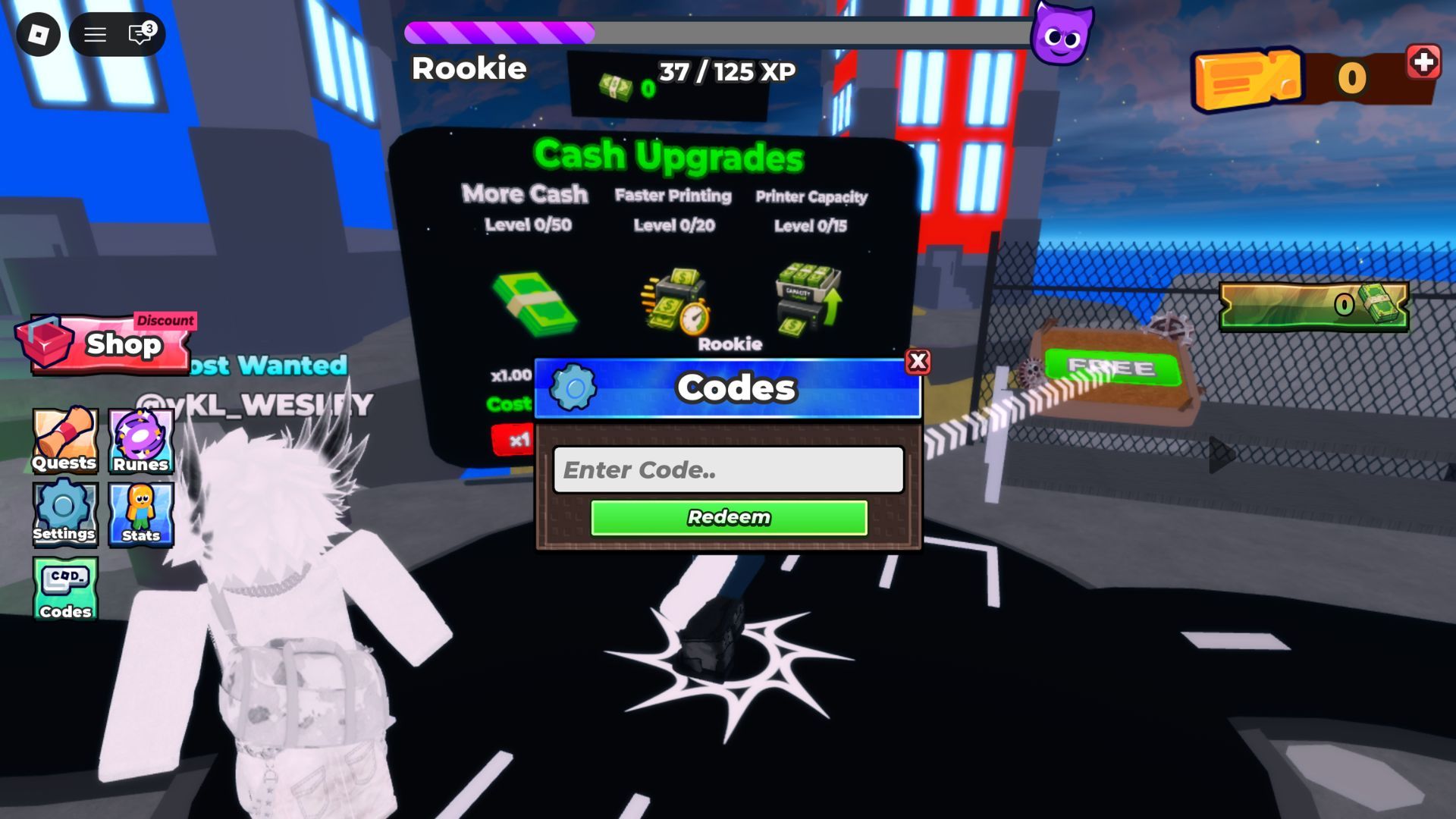
Redeeming a Printer Incremental code is a short in-game action, not a Discord ritual and not a group-join gate we can document. You already have the live strings on the codes hub. This page is only the field, the typing rules, and what to do when Redeem fails.
You play on live 8-player servers with a public leaderboard. Printers keep generating cash while the shop panel is open. Finish the codes, close the panel, then collect. A boost sitting on uncollected bills is a wasted grant.
Before you type anything
- Launch Printer Incremental on Roblox from Entertainment In Progress (Mayf and Sami).
- Wait until the island loads. Live HUD captures show a left cluster (Shop, Quests, Runes, Settings, Stats, Codes) and a Cash Upgrades board with More Cash, Faster Printing, and Printer Capacity.
- Keep the tracked strings handy: World2, 4SORRYFORDELAY, Release, and bugfix.
- Do not dump the first cash pile into a MAX buy yet. A free boost or extra cash is weaker if you already spent the starter stack on the wrong node.
If this is your first session, redeem first and read getting started second. The full loop still lives in how to play. Codes only change the size of the first pile.
We have no sourced requirement to join a community group before the field works. Open the in-game Codes button on the left HUD. Do not paste strings into Roblox chat, the Experience invite box, or a third-party executor.
Step-by-step redeem
- On the left HUD, tap Codes (it sits under Settings and Stats in captured screens). That opens a Codes window, not Roblox Settings.
- Click the Enter Code.. field so a cursor appears.
- Type one string exactly. Start with World2, then 4SORRYFORDELAY, then Release, then bugfix.
- Press the green Redeem button. Wait for grant text or an error. Do not mash the button.
- Leave the panel open until the result appears, then clear the field and enter the next string.
- Close the panel, walk back to your printers, and collect cash so a boost is not sitting on the floor.
That is the whole official path: left Codes button, Enter Code.. field, Redeem.
Mobile, PC, and console clients all use the same Roblox experience. The button labels may scale, but you are still looking for Codes or Shop, a text field, and Redeem. There is no separate split-screen redeem flow. Servers are shared and online.
Exact typing rules
Codes are case-sensitive and they expire.
- World2 is a single token.
World 2,world2, andWORLD2are different strings. - 4SORRYFORDELAY is one token with the leading 4. Do not drop the digit.
- Release is one word with a capital R. Do not assume
releaseorRELEASEwill work. - bugfix is lowercase in the community list we tracked. Do not “correct” it to BugFix.
- No spaces before or after the word.
- One code per redeem. Do not comma-separate the list.
If you copy from a video overlay, watch for a hidden trailing space. Paste, delete the gap, then press Redeem.
If Redeem fails
Work this checklist once before you assume the wiki is wrong:
- Wrong capitals or a space you cannot see.
- The account already claimed that string.
- The code expired after a patch. The last Roblox update we tracked is 4 September 2026.
- You are still on a loading island, not in a live server.
- You typed the string into chat instead of the Codes or Shop field.
A failed redeem does not wipe printers, cash, coins, or gems. You can still buy, collect, and turn on Auto Collect.
Do not hunt random comment-section codes. This wiki only tracks the four sourced strings. When Entertainment In Progress adds a new Use code line on the Roblox page, it lands on the codes hub first. If Redeem says a community string is invalid, drop it and keep printing.
After a successful grant
Read the in-game text. Code roundups credit World2 with 10 Tickets and 4SORRYFORDELAY with +2 All Potions and 25 tickets. Release may already be expired even though the Roblox description still names it. bugfix is community-sourced; take whatever the popup actually grants.
Then run the real loop:
- Collect cash from every printer you already own.
- Buy another printer if the shop is offering one.
- Spend on Increase Cash Gain when that purchase is available.
- Use BUY for a single rank if you are unsure. Use MAX only when you already know the node is the one you want.
- Enable Auto Collect so you can watch the 8-player leaderboard without leaving bills on the tiles.
Roblox Premium is +10% Cash on the official page. It is not entered in the codes field and it does not need Redeem.
Tickets are a real code payout. This page does not invent a ticket shop, ticket prices, or the cash those tickets convert into. Spend them, then return to printers and Increase Cash Gain.
When to redeem again
- First session on a new account, before the first MAX buy.
- After a hotfix morning, which is why bugfix exists on community lists.
- After a world-themed patch — World2 already showed that pattern.
- Whenever the codes hub gains a row.
You do not re-redeem a working code every login. If the field says you already claimed it, close the panel and go print.
The grant is only useful if it becomes printers and cash gain. Pair this page with getting started for the first-hour order and how to play for the collect-upgrade-unlock loop. When the starter island stalls, take the extra cash into the World 2 notes instead of standing on the same shop board.
Printer Incremental launched on 30 July 2026. Recheck the redeem field after updates, not after every minute of idle time. Codes expire. Printers do not.
Frequently Asked Questions
Quick answers to the most common Printer Incremental questions.
Where is the Printer Incremental redeem field?
Tap **Codes** on the left HUD, then use the **Enter Code..** field. Follow this page and the live list on the codes hub.
Do I need to join a Roblox group to redeem?
We have no sourced group requirement. Type World2, 4SORRYFORDELAY, Release, and bugfix into the left-side codes box and press Redeem.
What order should I redeem the codes?
Use World2 first, then 4SORRYFORDELAY, Release, and bugfix. Claim the live list before the first-hour plan in getting started.
Can I redeem on mobile?
Yes. Printer Incremental is a Roblox experience, so the same Codes or Shop field is on mobile, PC, and console. Type exactly and press Redeem.
What if Release already says claimed?
Skip it and try World2, 4SORRYFORDELAY, then bugfix. A used code does not block printers. Keep following how to play.
Do codes work in every server?
Redeem on a live 8-player server after the island loads. You do not need a private server. Shared servers and the public leaderboard are the normal mode.