
Printer Incremental Shop, Quests, Runes, and the Left HUD
Open Shop for Cash Upgrades, Codes for tickets, and leave Settings alone when you meant to redeem.
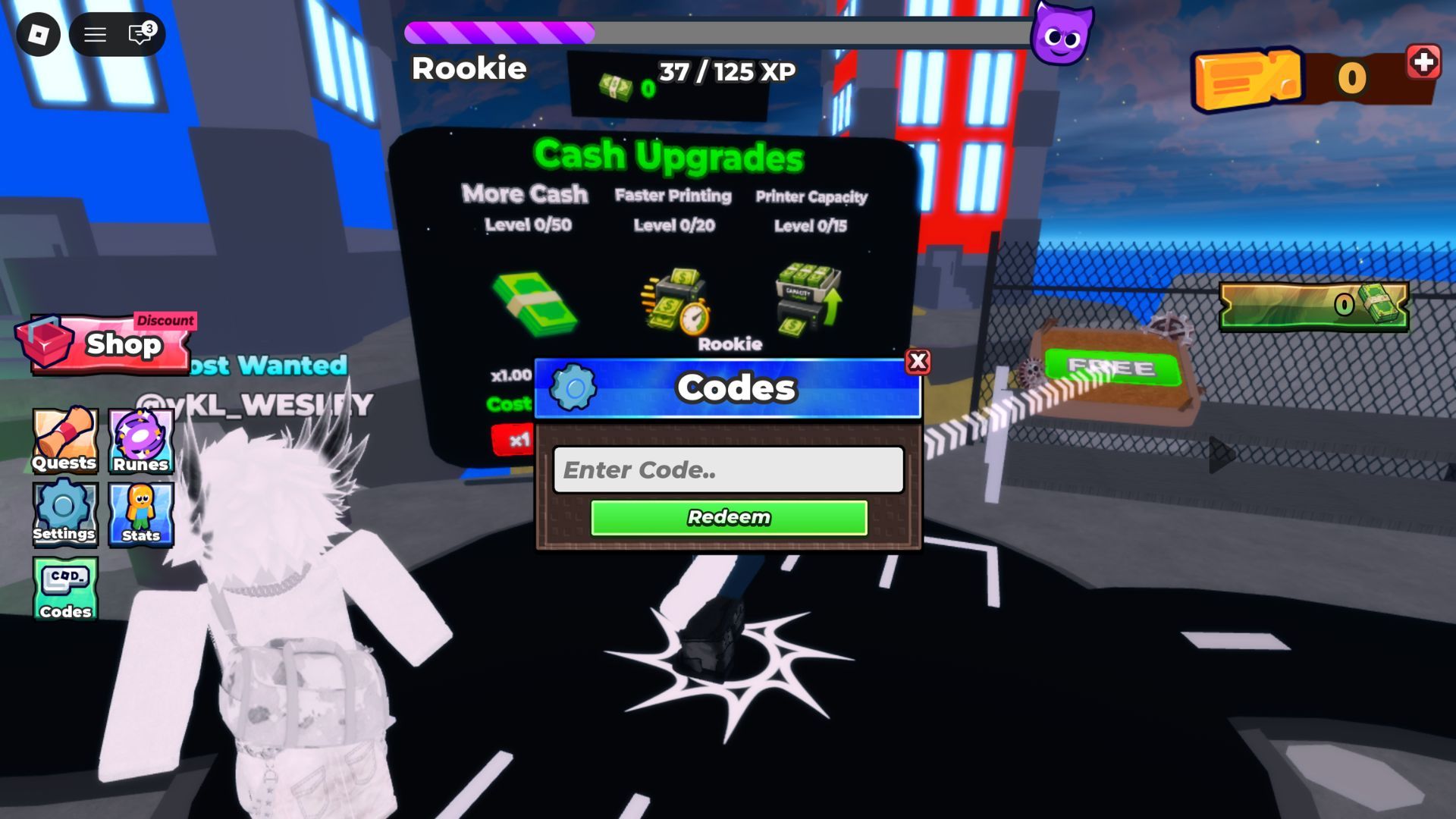
Printer Incremental puts a vertical cluster on the left of the HUD. Live captures of a Rookie session show six buttons in that stack: Shop, Quests, Runes, Settings, Stats, and Codes. The same shot shows a Cash Upgrades board in the world (More Cash, Faster Printing, Printer Capacity), a Rank label reading Rookie, an XP bar, and a ticket-plus-cash strip on the top-right. This page is the HUD map. It does not invent quest tables, rune drop rates, or a Settings code field.
Entertainment In Progress (Mayf and Sami) launched the experience on 30 July 2026. You still buy printers, collect cash, and climb an 8-player leaderboard. The left cluster is how you reach the tools around that loop. Open the wrong door and you will type World2 into chat or hunt runes before you own a printer.
Shop
Shop is the door into spending. Captures place it at the top of the left stack, marked with a discount badge on the screenshot we have. Players who tap Shop are trying to reach Cash Upgrades, printers, or the BUY / MAX row. That is the correct door for cash upgrades and printers. It is the wrong door for codes.
If Shop opens a board you do not recognize after a patch, do not Max it. Buy once or leave it. Rank unknown rows as unproven on the tier list. Shop is not a license to empty the wallet because a new panel appeared on 4 September 2026 or any later morning.
Codes
Codes sits at the bottom of the captured left stack, under Settings and Stats. Tapping it opens a Codes window with an Enter Code.. field and a green Redeem button. That is the only official redeem path this wiki documents. Full clicks live on how to redeem. The live strings live on the codes hub. Tickets from those strings are explained on how to get tickets.
Do not type codes into Settings, chat, or a third-party executor. Settings is for client options. Chat is for the 8-player room. Executors are account risk; see scripts.
Quests
Quests is on the left cluster. That is as far as official, photographable evidence goes. This wiki will not invent a quest list, daily reset time, or XP-per-quest table. The captured HUD already shows an XP bar and a Rookie rank. Quests may feed that bar. They may not. Until Entertainment In Progress posts a quest sheet, treat Quests as an optional door you open after a printer is printing, not before getting started is done.
If a quest asks you to collect cash, you were going to collect anyway. If a quest asks you to buy a shop node, check the upgrade rankings first so you do not complete a quest by Maxing a B-tier row. If a quest is unclear, close it and print. Incremental games punish walking away from the loop more than they punish skipping a mystery objective.
Runes
Runes is on the same left stack. Captured screens prove the button exists. They do not prove drop rates, rune names, or a ticket-to-rune exchange. Do not import rune tables from other Roblox incrementals. This is Printer Incremental, not a luck simulator we have a public Trello for.
Open Runes after codes, a printer, More Cash, and Auto Collect, or do not open it yet. If the panel wants tickets, spend tickets only after you understand how to get tickets. If the panel wants cash, rank the spend against More Cash. If the panel is empty or locked, leave it. A locked rune door is not a bug you fix with a script.
Settings and Stats
Settings is client options. Use it for volume, graphics, and data prompts the game actually shows. It is not the redeem field. Stats is an account or session readout. Use it to glance at cash and progress. It is not the public leaderboard, which is the competitive cash ranking across accounts.
If Stats shows a rank such as Rookie, that is a label, not a build order. Do not stall the first hour trying to leave Rookie before Auto Collect is on. Rank climbs when you print. Printing starts on printers, not on the rank badge. The dedicated walkthrough is Rookie rank and XP. The green FREE crate on the island is a map pickup, not a Shop row — grab it on the first walk using the FREE crate page, then come back to Shop.
First-hour HUD order
- Ignore Quests, Runes, and the leaderboard for the first collect.
- Open Codes. Redeem the live list.
- Close Codes. Buy a printer. Collect.
- Open Shop or the world Cash Upgrades board. Buy More Cash.
- Turn on Auto Collect when you can afford it.
- Then glance at Quests or Runes if you still have attention left.
That order is the getting started script mapped onto the photographed HUD. How to play still owns Buy versus Max. How to get cash still owns the wallet. This page only stops you from opening the wrong left-side button.
What this HUD page will not invent
No quest spreadsheet. No rune odds. No secret Settings code. No claim that Shop sells Robux printers. No PvP in Stats. The official Roblox description still says buy printers, collect cash, upgrade printers, unlock better printers, climb leaderboards. Premium is +10% Cash. World 2 is a later layer on the World 2 guide. Everything else on the left stack is a door. Walk through Shop and Codes first.
Printer Incremental runs 8-player online servers. Other people can stand next to your HUD. They cannot redeem your codes. They should not decide which left button you tap. Open Codes, then Shop, then print.
Frequently Asked Questions
Quick answers to the most common Printer Incremental questions.
Where is the Printer Incremental shop?
Live HUD captures put **Shop** at the top of the left cluster. Use it for spending. Use **Codes** at the bottom of that cluster for tickets. See cash upgrades for the board inside.
Is Codes the same as Settings?
No. Codes opens **Enter Code..** and Redeem. Settings is client options. Clicks are on how to redeem.
Should I do Quests before buying a printer?
No. Finish the getting started order first. Quests are an optional door with no published table on this wiki.
What do Runes do?
The button exists on the left HUD. This wiki will not invent drop rates. Open Runes after printers, More Cash, and Auto Collect, or skip it.
What does Rookie mean?
Captured HUDs show a Rookie rank next to an XP bar. It is a label, not a shopping list. Climb it by printing, then check the leaderboard for cash rank.
Where do tickets come from on this HUD?
From the **Codes** button, not from Shop. Read how to get tickets and the codes hub.