
Controls and HUD in Printer Incremental
Walk the island, open Shop and Codes, use Buy versus Max, and collect piles — Roblox defaults plus on-screen UI.
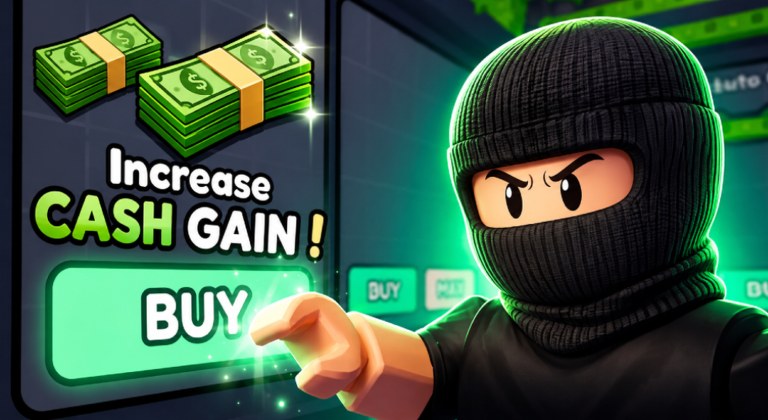
Printer Incremental does not ship a custom keybind bible this wiki can cite. You move with Roblox defaults. You click on-screen HUD and island kiosks for Shop, Codes, Increase Cash Gain, Buy, Max, and Auto Collect. That is the control scheme. Anything more specific — a secret hotkey for Max, a hidden gamepad chord, a named key that opens World 2 — would be invented, so it stays off this page.
This article is HUD literacy. The loop those buttons feed lives in how to play. Auto Collect as a purchase lives in how to get Auto Collect. Typing codes lives in how to redeem codes. The public board lives on the cash leaderboard. Use this page to find the controls. Use those pages to decide what to press.
The game is a live Roblox incremental from Entertainment In Progress (Mayf and Sami). It launched on 30 July 2026, last updated on 4 September 2026 on the sources this wiki tracks, and runs 8-player online servers. Official thumbs show a compact island: stacked printers, cash piles, coin and gem boards, and shop kiosks. Your hands only need to walk that island, open the right panel, and collect or spend.
PC and mobile use the same experience
There is one Printer Incremental place, not a PC edition and a mobile edition. Keyboard, mouse, touch, and (if Roblox itself supports it on your device) a gamepad all load the same 8-player island. Labels may scale. The verbs do not.
On PC, Roblox default movement is how you walk the pads: the usual move keys and camera look. Jump is the usual jump control if you need a lip on a stack. This wiki will not print a WASD-versus-arrows argument or a custom rebind table the developers never posted. If your Roblox settings already remapped movement, those remaps still apply here. Printer Incremental does not replace them with a unique overlay we can document.
On mobile, you walk with the on-screen thumbstick Roblox already draws and you look by dragging the camera the way every other experience does. Tap piles to collect them until Auto Collect is on. Tap kiosks and HUD buttons to open Shop or Codes. There is no split-screen redeem flow and no mobile-only Max chord.
If a control does not appear, rotate the camera until the kiosk row and the upgrade UI are both in view. A buried HUD is a camera problem, not a missing bind.
Walk the island before you open every menu
Load in. Let the island finish. Point the camera at stacked printers first so you can see output with your eyes. Point it at kiosks second so Buy, Max, Increase Cash Gain, and Auto Collect stay one turn away. Glance at cash, coins, and gems so you are not surprised they exist, then ignore coins and gems until an official patch explains a spend. Cash is the resource the documented buttons spend.
You share the island with up to seven other people. Walking is navigation, not combat. If someone is standing on a pad, walk around them or hop servers. This page will not invent a shove key or a grief tool.
When the starter pads feel crowded, that crowding is a layer signal, not a reason to hunt a hidden control. World 2 is the next island layer. You still walk, open Shop, and collect when you get there.
Shop and Codes on the HUD
Find a Shop or Codes control on the HUD or on a shop board. Incremental Roblox games in this style put the code field there, not in Roblox Settings and not in chat. Open the panel, click the text box, type one string, press Redeem. The click-by-click version is how to redeem. The live strings are Release, World2, and bugfix.
Do not type codes into chat. Do not type them into the Experience invite box. Do not hunt a keyboard shortcut that auto-opens Codes. If you cannot see the field, walk the kiosk row and look again. Mobile, PC, and console clients all use the same Roblox experience.
Close the panel when you are done. Printers keep printing while Shop is open, but a boost sitting on uncollected bills is still a wasted grant until you collect or until Auto Collect is on.
Buy versus Max
Buy and Max are spend modes on whatever shop node you have selected. They are not movement keys.
Buy purchases one step so you can measure. Max spends as much cash as that node will take in one click. Use Buy when you are testing Increase Cash Gain, a printer, or Auto Collect. Use Max when you already measured and the label is the node you want. First-hour players Max because the button is larger. That habit dumps a wallet into a mystery row.
A clean test is three clicks: select the node, Buy once, watch one print cycle, then either Max that same node or walk away. If you cannot see which printer the kiosk is talking about, Buy is the only safe click. How to play unpacks the habit. This page only needs you to know both buttons are on the upgrade row next to Increase Cash Gain and Auto Collect.
Collecting piles by hand
Until Auto Collect is on, collection is a walk-and-tap job. Move to the cash on the pads and collect it with the default interact the client already uses — click or tap the pile. There is no sourced vacuum key. There is no documented hold-to-collect chord. If bills are sitting and you have not bought Auto Collect yet, you are the courier.
Once Auto Collect is for sale, buy it using the same HUD row. Walking piles after you can afford the node is not a control flex. It is lost cash. The purchase chapter is how to get Auto Collect. After it is on, your hands should go back to Shop decisions, not to touring every pad.
Coins and gems can sit on boards in official art. Tickets appear in community script videos. This HUD guide will not invent collect shortcuts or shops for those extras. If you can pick them up with the same tap you use on cash, fine. Do not remap your session around a ticket economy that is not documented.
Leaderboard glance
The public cash leaderboard is a scoreboard, not a control panel. Glance at the start of a session and at the end. Ten seconds is enough. Anything longer is spectating. The board does not tell you which kiosk to click and it does not bind a hotkey that spends for you.
Climb advice lives on the leaderboard page. This HUD page only needs you to know the board exists, that servers are 8-player, and that rank is account cash — not which island you are standing on. If the HUD feels loud, hide the board behind camera work and keep Shop in view. Camera is a Roblox default. Do not hunt a game-specific hide-UI key this wiki cannot cite.
Roblox Premium is +10% Cash on the official page. It is not a HUD button you toggle in Printer Incremental. Like and favorite on the Roblox experience page are also outside this island. Neither one remaps WASD.
A clean input loop
- Walk with Roblox defaults until printers and kiosks are on screen.
- Open Codes or Shop, redeem Release, World2, and bugfix, then close the panel.
- Collect piles by click or tap until Auto Collect is on.
- Use Buy to test a labeled node. Use Max only after the test.
- Glance at the leaderboard, then look back at the island.
That is every control this wiki will claim. If a video overlay draws extra hotkeys, treat them as the creator’s overlay, not as Entertainment In Progress documentation. After a patch — the latest stamp here is 4 September 2026 — re-find Shop, Codes, Buy, Max, Increase Cash Gain, and Auto Collect with your eyes. If those six still exist, your hands already know the game.
Frequently Asked Questions
Quick answers to the most common Printer Incremental questions.
What are the Printer Incremental controls on PC?
Roblox default movement and camera, plus on-screen Shop, Codes, Buy, Max, Increase Cash Gain, and Auto Collect. This wiki does not invent extra keybinds. The loop those buttons feed is in how to play.
How do I play Printer Incremental on mobile?
Same experience, touch instead of keyboard. Walk with the Roblox thumbstick, drag the camera, tap piles to collect, and tap HUD or kiosks for Shop and Codes.
Where do I open Shop and Codes?
On the HUD or a shop board, not in Roblox Settings and not in chat. Step-by-step typing is on how to redeem codes.
What is the difference between Buy and Max on the HUD?
Buy is one step so you can measure. Max spends as much cash as the selected node allows. Test with Buy, then Max only a labeled node you already want.
Do I have to walk piles forever?
Only until you can afford Auto Collect. Walking after that node is for sale is lost cash. See how to get Auto Collect.
Does the leaderboard use its own controls?
No. It is a public cash scoreboard. Glance, then return to the island. Climb advice is on the leaderboard page.